Geometric Modeling of EHT Data
Comrade has been designed to work with the EHT and ngEHT. In this tutorial, we will show how to reproduce some of the results from EHTC VI 2019.
In EHTC VI, they considered fitting simple geometric models to the data to estimate the black hole's image size, shape, brightness profile, etc. In this tutorial, we will construct a similar model and fit it to the data in under 50 lines of code (sans comments). To start, we load Comrade and some other packages we need.
To get started we load Comrade.
using ComradeWe load uvfits with the pure-Julia VLBIFiles loader. VLBIFiles re-exports VLBIData, so the VLBI averaging namespace is in scope too.
using VLBIFilesFor reproducibility we use a stable random number genreator
using StableRNGs
rng = StableRNG(42)StableRNGs.LehmerRNG(state=0x00000000000000000000000000000055)The next step is to load the data. We will use the publically available M 87 data which can be downloaded from cyverse. For an introduction to data loading, see Loading Data into Comrade.
uvd = VLBIFiles.load(
    VLBIFiles.UVData,
    joinpath(__DIR, "..", "..", "Data", "SR1_M87_2017_096_lo_hops_netcal_StokesI.uvfits")
)
VLBIFiles.UVData("/home/runner/work/Comrade.jl/Comrade.jl/examples/Data/SR1_M87_2017_096_lo_hops_netcal_StokesI.uvfits", VLBIFiles.UVHeader(SIMPLE = T / conforms to FITS standard
BITPIX = -32 / array data type
NAXIS = 7 / number of array dimensions
NAXIS1 = 0
NAXIS2 = 3
NAXIS3 = 4
NAXIS4 = 1
NAXIS5 = 1
NAXIS6 = 1
NAXIS7 = 1
EXTEND = T
GROUPS = T / has groups
PCOUNT = 9 / number of parameters
GCOUNT = 8645 / number of groups
OBSRA = 187.7059307575226
OBSDEC = 12.39112323919932
OBJECT = 'M87 '
MJD = 57849.0
DATE-OBS= '2017-04-06'
BSCALE = 1.0
BZERO = 0.0
BUNIT = 'JY '
VELREF = 3
EQUINOX = 'J2000 '
ALTRPIX = 1.0
ALTRVAL = 0.0
TELESCOP= 'VLBA '
INSTRUME= 'VLBA '
OBSERVER= 'EHT '
CTYPE2 = 'COMPLEX '
CRVAL2 = 1.0
CDELT2 = 1.0
CRPIX2 = 1.0
CROTA2 = 0.0
CTYPE3 = 'STOKES '
CRVAL3 = -1.0
CDELT3 = -1.0
CRPIX3 = 1.0
CROTA3 = 0.0
CTYPE4 = 'FREQ '
CRVAL4 = 2.27070703125e11
CDELT4 = 1.856e9
CRPIX4 = 1.0
CROTA4 = 0.0
CTYPE6 = 'RA '
CRVAL6 = 187.7059307575226
CDELT6 = 1.0
CRPIX6 = 1.0
CROTA6 = 0.0
CTYPE7 = 'DEC '
CRVAL7 = 12.39112323919932
CDELT7 = 1.0
CRPIX7 = 1.0
CROTA7 = 0.0
PTYPE1 = 'UU---SIN'
PSCAL1 = 4.4039146672722e-12
PZERO1 = 0.0
PTYPE2 = 'VV---SIN'
PSCAL2 = 4.4039146672722e-12
PZERO2 = 0.0
PTYPE3 = 'WW---SIN'
PSCAL3 = 4.4039146672722e-12
PZERO3 = 0.0
PTYPE4 = 'BASELINE'
PSCAL4 = 1.0
PZERO4 = 0.0
PTYPE5 = 'DATE '
PSCAL5 = 1.0
PZERO5 = 0.0
PTYPE6 = 'DATE '
PSCAL6 = 1.0
PZERO6 = 0.0
PTYPE7 = 'INTTIM '
PSCAL7 = 1.0
PZERO7 = 0.0
PTYPE8 = 'TAU1 '
PSCAL8 = 1.0
PZERO8 = 0.0
PTYPE9 = 'TAU2 '
PSCAL9 = 1.0
PZERO9 = 0.0
HISTORY AIPS SORT ORDER='TB', "M87", Dates.Date("2017-04-06"), [:RR, :LL, :RL, :LR], 2.27070703125e11 Hz), VLBIFiles.FrequencyWindow[VLBIFiles.FrequencyWindow(1, 1, 2.270707f11 Hz, 1.856f9 Hz, 1, 1, 1.0f0)], VLBIFiles.AntArray[VLBIFiles.AntArray("VLBA", 2.270707f11 Hz, {1 = Antenna AA, 2 = Antenna AP, 3 = Antenna AZ, 4 = Antenna JC, 5 = Antenna LM, 6 = Antenna PV, 7 = Antenna SM, 8 = Antenna SR}, [0.0, 0.0, 0.0])])Since the gains in this dataset are coherent across a scan, we extract scan-averaged closures. Since uvfits aren't guaranteed to have the scan table we use a gap-based scan averaging scheme.
dlcamp, dcphase = extract_table(
    uvd,
    LogClosureAmplitudes(; time_average = VLBI.GapBasedScans()),
    ClosurePhases(; time_average = VLBI.GapBasedScans()),
)
(EHTObservationTable{Comrade.EHTLogClosureAmplitudeDatum{:I}}
source: M87
mjd: 57849
bandwidth: 1.856e9
sites: [:AA, :AP, :AZ, :JC, :LM, :PV, :SM]
nsamples: 142, EHTObservationTable{Comrade.EHTClosurePhaseDatum{:I}}
source: M87
mjd: 57849
bandwidth: 1.856e9
sites: [:AA, :AP, :AZ, :JC, :LM, :PV, :SM]
nsamples: 173)We also remove the trivial 0-baseline triangles (we don't care about large-scale flux) and inflate the noise by 2% in quadrature to account for residual systematics.
isshort(d) = any(b -> hypot(b.U, b.V) < 0.1e9, d.baseline)
dlcamp = flag(isshort, dlcamp)
dcphase = flag(isshort, dcphase)
add_fractional_noise!(dlcamp, 0.02)
add_fractional_noise!(dcphase, 0.02)
EHTObservationTable{Comrade.EHTClosurePhaseDatum{:I}}
source: M87
mjd: 57849
bandwidth: 1.856e9
sites: [:AA, :AP, :AZ, :JC, :LM, :PV, :SM]
nsamples: 93!!!warn We remove the low-snr closures since they are very non-gaussian. This can create rather large biases in the model fitting since the likelihood has much heavier tails that the usual Gaussian approximation.
For the image model, we will use a modified MRing, a infinitely thin delta ring with an azimuthal structure given by a Fourier expansion. To give the MRing some width, we will convolve the ring with a Gaussian and add an additional gaussian to the image to model any non-ring flux. Comrade expects that any model function must accept a named tuple and returns must always return an object that implements the VLBISkyModels Interface
using Distributions, VLBIImagePriors

@sky function sky(grid)
    radius ~ VLBIUniform(μas2rad(10.0), μas2rad(30.0))
    width ~ VLBIUniform(μas2rad(1.0), μas2rad(10.0))
    ma ~ (VLBIUniform(0.0, 0.5),)
    mp ~ (VLBIUniform(0, 2π),)
    τ ~ VLBIUniform(0.0, 1.0)
    ξτ ~ VLBIUniform(0.0, π)
    f ~ VLBIUniform(0.0, 1.0)
    σG ~ VLBIUniform(μas2rad(1.0), μas2rad(100.0))
    τG ~ VLBIExponential(1.0)
    ξG ~ VLBIUniform(0.0, 1π)
    xG ~ VLBIUniform(-μas2rad(80.0), μas2rad(80.0))
    yG ~ VLBIUniform(-μas2rad(80.0), μas2rad(80.0))
    α = ma .* cos.(mp .- ξτ)
    β = ma .* sin.(mp .- ξτ)
    ring = f * smoothed(modify(MRing(α, β), Stretch(radius, radius * (1 + τ)), Rotate(ξτ)), width)
    g = (1 - f) * shifted(rotated(stretched(Gaussian(), σG, σG * (1 + τG)), ξG), xG, yG)
    return ring + g
end
sky (generic function with 1 method)The syntax here follows standard probablisitic notation. Namely ~ denotes that the parameter on the left is distributed according to the distribution on the right. These are essentially the parameters of our model. For example, radius is the radius of the ring and is distributed according to a uniform distribution between 10 and 30 μas. Other variables like α and β are deterministic functions of the parameters on the left-hand side of the ~. The model function must return an object that implements the VLBISkyModel interface. In this case, we return a sum of a smoothed MRing and a Gaussian.
The @sky macro then transforms this into a function called sky that we can then use to initialize or construct our sky model for some given grid.
skym = sky(imagepixels(μas2rad(200.0), μas2rad(200.0), 128, 128))SkyModel
with map: _sky_sky
on grid:
RectiGrid(
executor: ComradeBase.Serial()
Dimensions:
(↓ X Sampled{Float64} LinRange{Float64}(-4.810260742258678e-10, 4.810260742258678e-10, 128) ForwardOrdered Regular Points,
→ Y Sampled{Float64} LinRange{Float64}(-4.810260742258678e-10, 4.810260742258678e-10, 128) ForwardOrdered Regular Points)
)
)Since we are fitting closures this is essentialy the entire model. In other tutorials we will show how to model the instrument directly, e.g., gains.
post = VLBIPosterior(skym, dlcamp, dcphase);Note
When fitting visibilities a instrument is required, and a reader can refer to Stokes I Simultaneous Image and Instrument Modeling.
This constructs a posterior density that can be evaluated by calling logdensityof. For example,
logdensityof(
    post, (
        sky = (
            radius = μas2rad(20.0),
            width = μas2rad(10.0),
            ma = (0.3,),
            mp = (π / 2,),
            τ = 0.1,
            ξτ = π / 2,
            f = 0.6,
            σG = μas2rad(50.0),
            τG = 0.1,
            ξG = 0.5,
            xG = 0.0,
            yG = 0.0,
        ),
    )
)-1205.968282463746Reconstruction
Now that we have fully specified our model, we now will try to find the optimal reconstruction of our model given our observed data.
Currently, post is in parameter space. Often optimization and sampling algorithms want it in some modified latent space. Comrade uses ProbabilityTransports to move a posterior into a latent space with transport_to(post, space). For example, nested sampling algorithms want the parameters in the unit hypercube, which is the StdUniform() latent space:
cpost = transport_to(post, StdUniform());To instead flatten the parameter space and move from constrained parameters to unconstrained (-∞, ∞) support (what gradient samplers like NUTS use) we transport to the TVFlat() space:
fpost = transport_to(post, TVFlat());A third option is the standard-normal latent space StdNormal(), which standardizes the prior into an unconstrained ℝⁿ Gaussian. It is also a good target for gradient-based samplers and is often better conditioned than the plain flat space:
npost = transport_to(post, StdNormal());These transported posteriors expect a vector of parameters. For example, we can draw from the prior in our usual parameter space
p = prior_sample(rng, post)(sky = (radius = 1.0476967761439489e-10, width = 1.3192620518421353e-11, ma = (0.48556673410322615,), mp = (4.671232796238441,), τ = 0.1709685492973101, ξτ = 2.214118964480774, f = 0.4410435910050243, σG = 3.9072695488826624e-10, τG = 1.8632965762164932, ξG = 2.2268237808386115, xG = 1.8564681567973552e-10, yG = 9.877917316231031e-11),)and then pull it back into each latent space with latent_pback (the inverse of the transport; latent_pfwd maps the other way, latent → parameters)
logdensityof(cpost, latent_pback(cpost, p))
logdensityof(fpost, latent_pback(fpost, p))
logdensityof(npost, latent_pback(npost, p))-12649.91130495715note that the log density is not the same across the three spaces, since each transport introduces a Jacobian to ensure volume is preserved. This is rather critical because it means that the maximum a posteriori (MAP) estimate differs between these latent spaces. In general, the MAP estimate is parameterization dependent. This is not the case for estimates that are derived from expectations of the posterior, e.g., the mean image.
Finding the Optimal Image
Typically, most VLBI modeling codes only care about finding the optimal or best guess image of our posterior post To do this, we will use Optimization.jl and specifically the BlackBoxOptim.jl package. For Comrade, this workflow is we use the comrade_opt function.
using Optimization
using OptimizationBBO
xopt, sol = comrade_opt(post, BBO_adaptive_de_rand_1_bin_radiuslimited(); maxiters = 50_000);
Given this we can now plot the optimal image or the maximum a posteriori (MAP) image.
using DisplayAs
using CairoMakie
g = imagepixels(μas2rad(200.0), μas2rad(200.0), 256, 256)
fig = imageviz(intensitymap(skymodel(post, xopt), g), colormap = :afmhot, size = (500, 400));
DisplayAs.Text(DisplayAs.PNG(fig))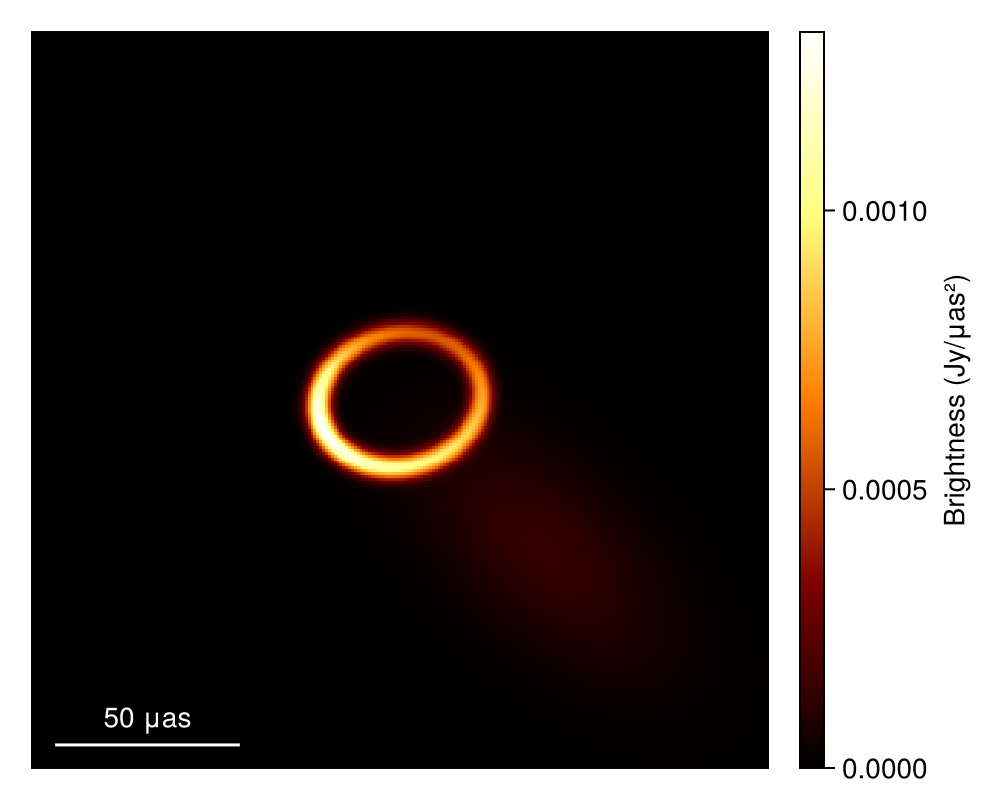
Quantifying the Uncertainty of the Reconstruction
While finding the optimal image is often helpful, in science, the most important thing is to quantify the certainty of our inferences. This is the goal of Comrade. In the language of Bayesian statistics, we want to find a representation of the posterior of possible image reconstructions given our choice of model and the data.
Comrade provides several sampling and other posterior approximation tools. To see the list, please see the Libraries section of the docs. For this example, we will be using Pigeons.jl which is a state-of-the-art parallel tempering sampler that enables global exploration of the posterior. For smaller dimension problems (< 100) we recommend using this sampler, especially if you have access to > 1 core.
using Pigeons
pt = pigeons(target = cpost, explorer = SliceSampler(), record = [traces, round_trip, log_sum_ratio], n_chains = 16, n_rounds = 8)
PT(checkpoint = false, ...)That's it! To finish it up we can then plot some simple visual fit diagnostics. First we extract the MCMC chain for our posterior.
chain = sample_array(cpost, pt)PosteriorSamples
Samples size: (256,)
sampler used: Pigeons
Mean
┌───────────────────────────────────────────────────────────────────────────────
│ sky ⋯
│ @NamedTuple{radius::Float64, width::Float64, ma::Tuple{Float64}, mp::Tuple{F ⋯
├───────────────────────────────────────────────────────────────────────────────
│ (radius = 1.01024e-10, width = 1.45094e-11, ma = (0.340053,), mp = (2.56124, ⋯
└───────────────────────────────────────────────────────────────────────────────
1 column omitted
Std. Dev.
┌───────────────────────────────────────────────────────────────────────────────
│ sky ⋯
│ @NamedTuple{radius::Float64, width::Float64, ma::Tuple{Float64}, mp::Tuple{F ⋯
├───────────────────────────────────────────────────────────────────────────────
│ (radius = 2.03134e-12, width = 2.58032e-12, ma = (0.0228723,), mp = (0.04518 ⋯
└───────────────────────────────────────────────────────────────────────────────
1 column omittedFirst to plot the image we call
imgs = intensitymap.(skymodel.(Ref(post), sample(chain, 100)), Ref(g))
fig = imageviz(imgs[end], colormap = :afmhot)
DisplayAs.Text(DisplayAs.PNG(fig))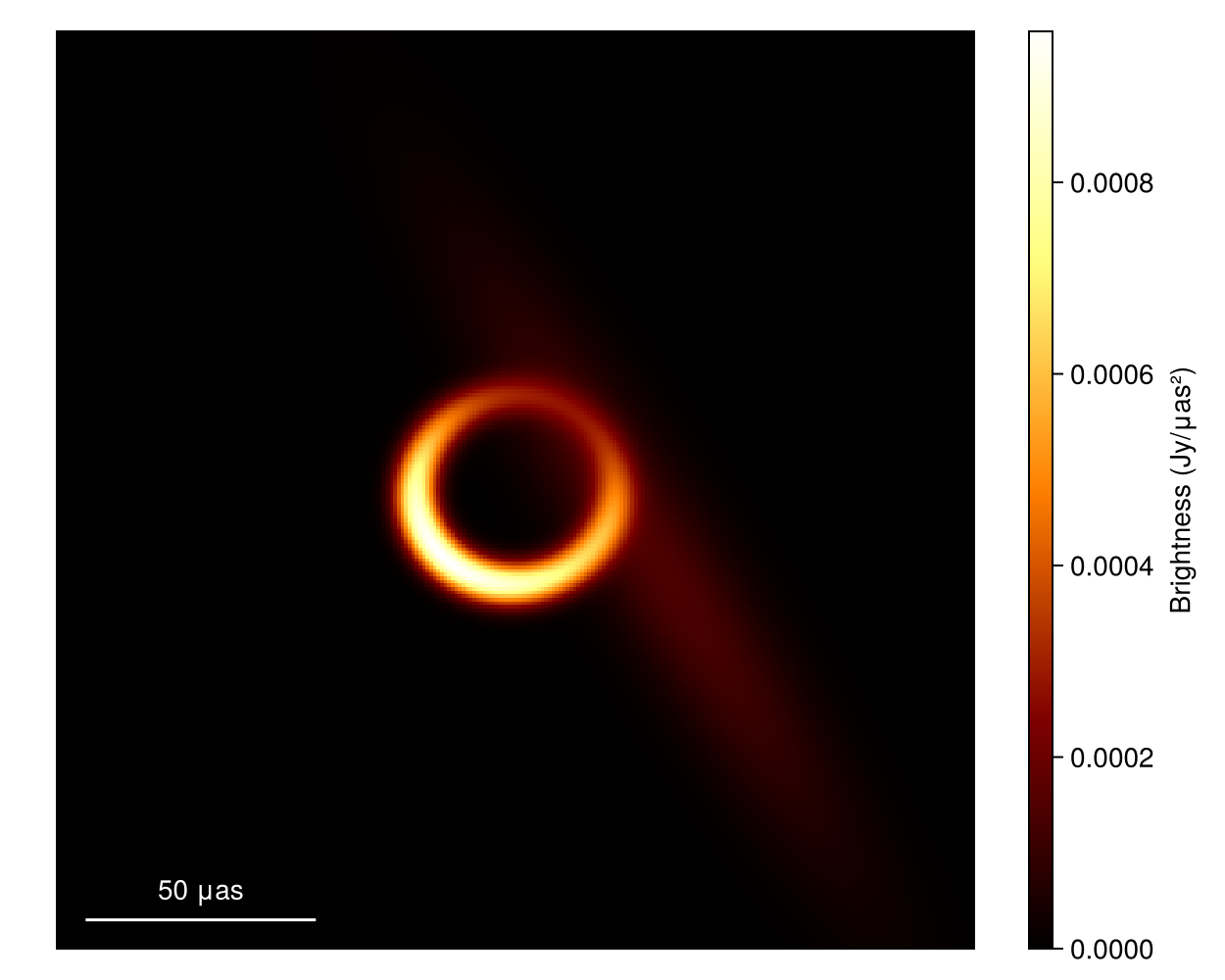
What about the mean image? Well let's grab 100 images from the chain, where we first remove the adaptation steps since they don't sample from the correct posterior distribution
meanimg = mean(imgs)
fig = imageviz(meanimg, colormap = :afmhot);
DisplayAs.Text(DisplayAs.PNG(fig))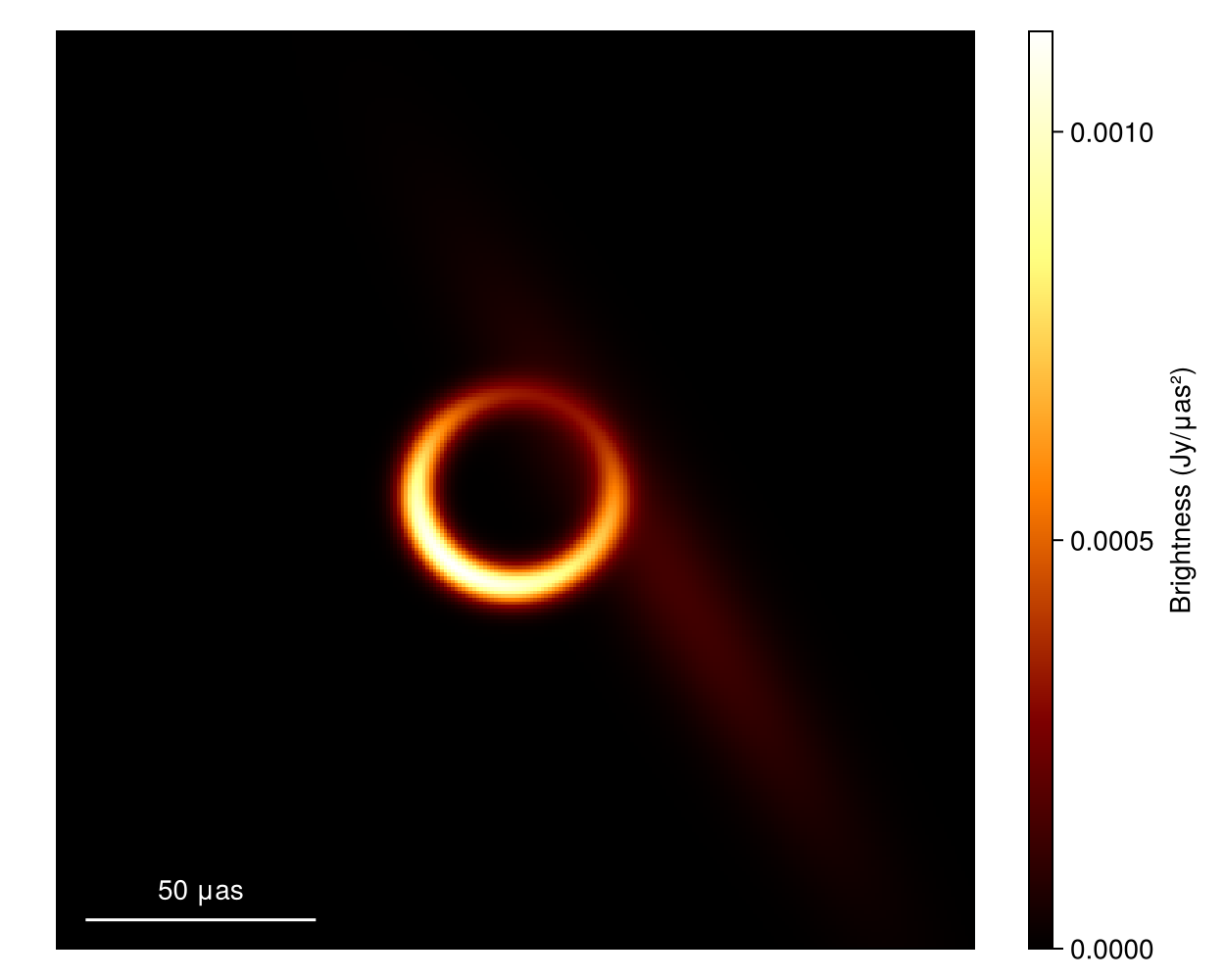
That looks similar to the EHTC VI, and it took us no time at all!. To see how well the model is fitting the data we can plot the model and data products. As of Comrade 0.11.7 Makie is the preferred plotting tool. For plotting data there are two classes of functions
baselineplotwhich gives complete control of plottingplotfields, plotfields!which are more automated and limited but will automatically add labels, legends, titles etc.
A reasonable workflow is to use plotfields to set up the initial figure and axis labels and then then use baselineplot! to add additional plots to the axis. For example,
lcsim, cpsim = simulate_observation(post, xopt; add_thermal_noise = false)
fig, ax1 = plotfields(lcsim, uvdist, measwnoise, scatter_kwargs = (; marker = :circle, label = "MAP"), figure_kwargs = (; size = (800, 300)), legend = false);
baselineplot!(ax1, dlcamp, uvdist, measurement, marker = :+, color = :black, label = "Data")
ax2, = plotfields!(fig[1, 2], cpsim, uvdist, mod2pi ∘ measwnoise, scatter_kwargs = (; marker = :circle, label = "MAP"), axis_kwargs = (ylabel = "Closure Phase (rad)",))
baselineplot!(ax2, dcphase, uvdist, mod2pi ∘ measurement, marker = :+, color = :black, label = "Data")
axislegend(ax1, framevisible = false)
DisplayAs.Text(DisplayAs.PNG(fig))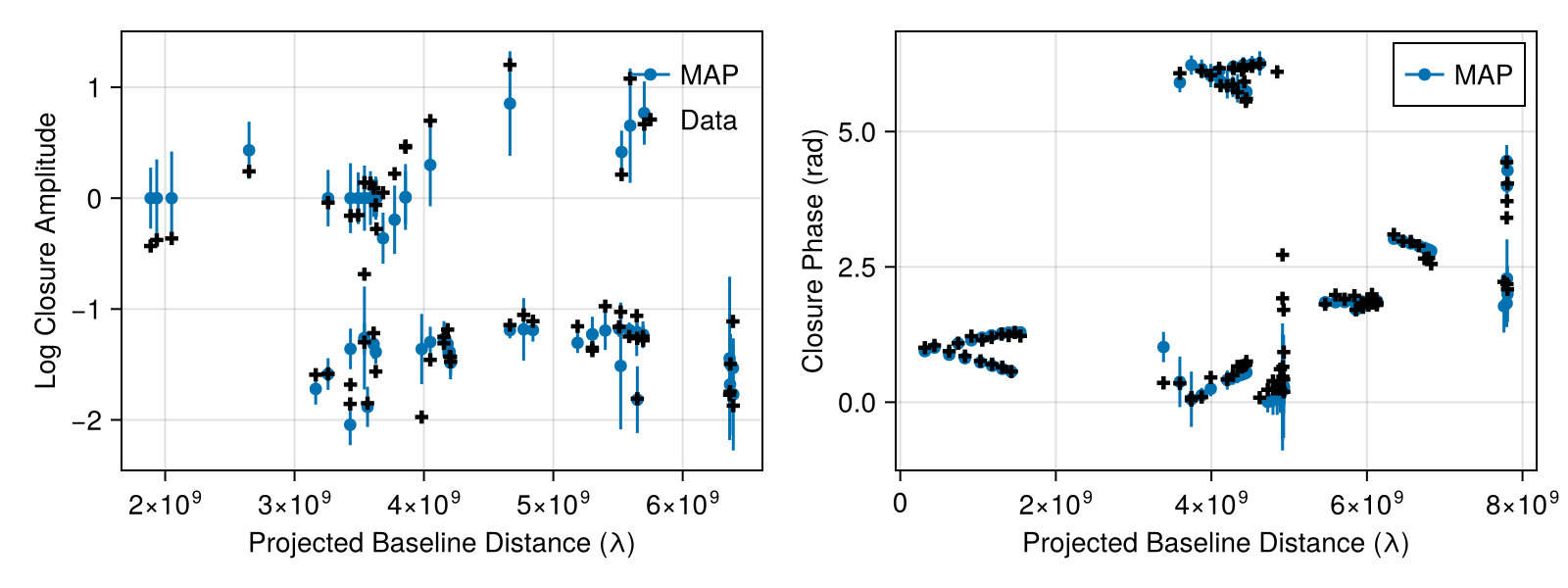
We can also plot random draws from the posterior predictive distribution. The posterior predictive distribution create a number of synthetic observations that are marginalized over the posterior.
fig = Figure(; size = (800, 300))
ax1 = Axis(fig[1, 1], xlabel = "√Quadrangle Area", ylabel = "Log Closure Amplitude")
ax2 = Axis(fig[1, 2], xlabel = "√Triangle Area", ylabel = "Closure Phase (rad)")
for i in 1:10
    mobs = simulate_observation(post, sample(chain, 1)[1])
    mlca = mobs[1]
    mcp = mobs[2]
    baselineplot!(ax1, mlca, uvdist, measurement, color = :grey, alpha = 0.2)
    baselineplot!(ax2, mcp, uvdist, mod2pi ∘ measurement, color = :grey, alpha = 0.2)
end
baselineplot!(ax1, dlcamp, uvdist, measurement, marker = :x)
baselineplot!(ax2, dcphase, uvdist, mod2pi ∘ measurement, marker = :x)
DisplayAs.Text(DisplayAs.PNG(fig))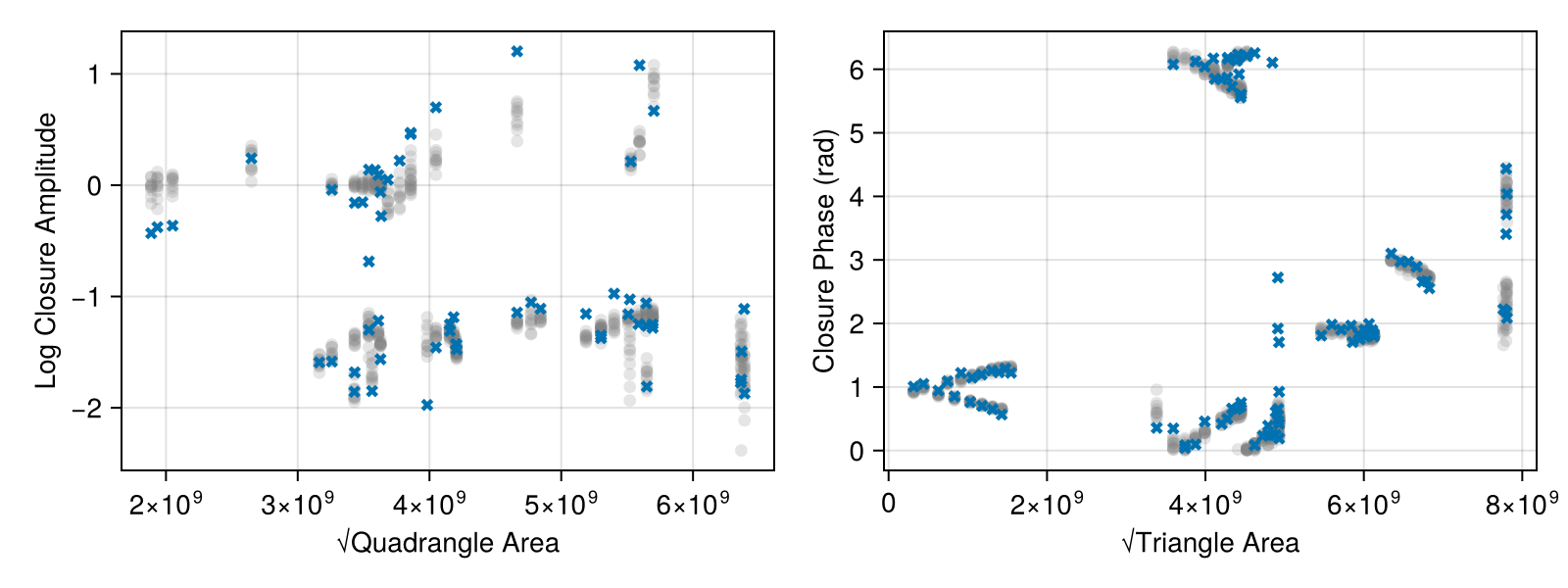
Finally, we can also put everything onto a common scale and plot the normalized residuals. The normalied residuals are the difference between the data and the model, divided by the data's error:
rd = residuals(post, chain[end])
fig, ax = plotfields(rd[1], uvdist, :res, axis_kwargs = (; ylabel = "Norm. Res. LCA"))
plotfields!(fig[2, 1], rd[2], uvdist, :res, axis_kwargs = (; ylabel = "Norm. Res. CP"))
DisplayAs.Text(DisplayAs.PNG(fig))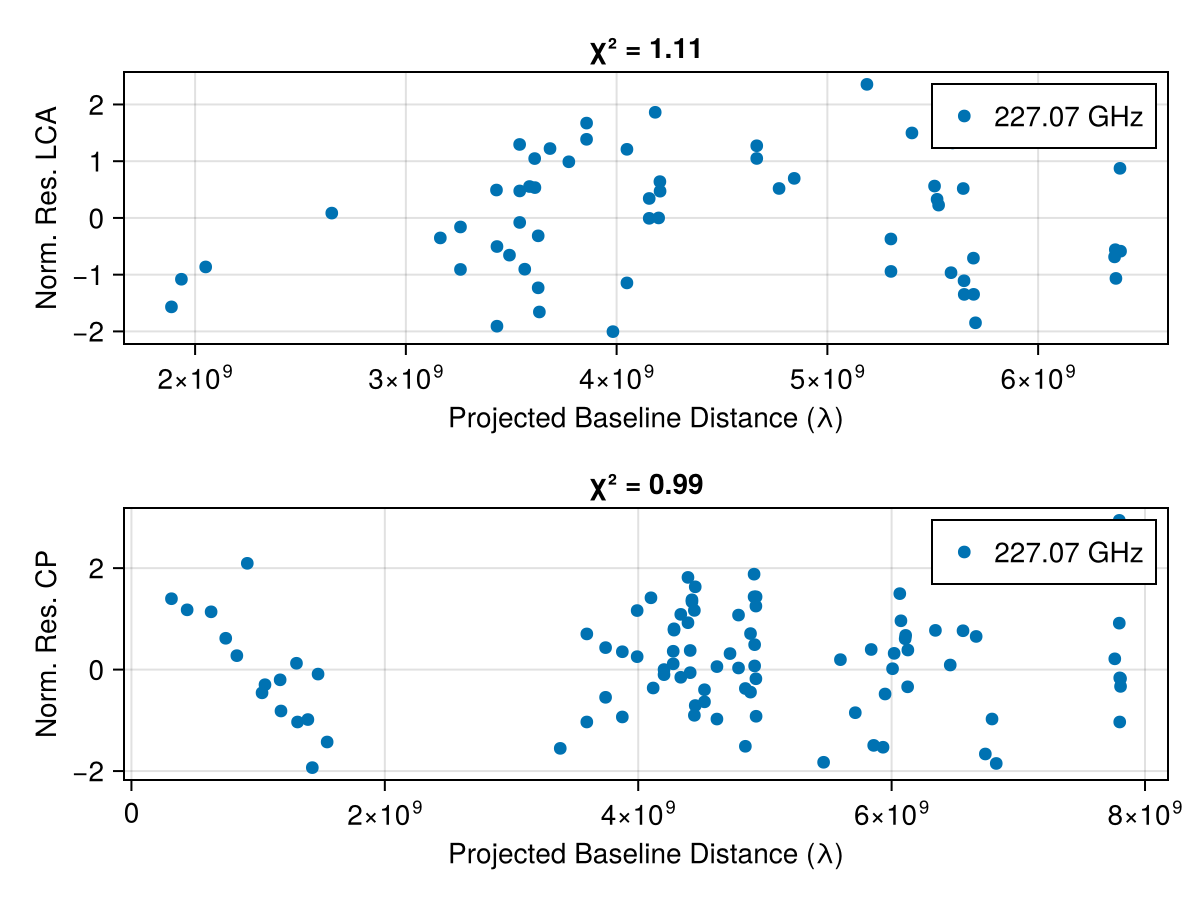
This page was generated using Literate.jl.